
Macro MNQ Automated Trading Indicator
The Macro MNQ automated trading indicator is purpose-built for MNQ futures, with TradingView and PickMyTrade automation support, historical statistics, pricing, and a seven-day trial.
MNQ Automated Trading Indicator:
Macro Strategy Built Specifically for MNQ Futures
Connect a clearly defined MNQ trading framework to TradingView and PickMyTrade to reduce emotional decision-making. A seven-day trial and monthly, annual, and lifetime plans are available.
What Is the Macro MNQ Automated Trading Indicator?
The Macro MNQ automated trading indicator is a rules-based tool designed for Micro E-mini Nasdaq-100 futures. Strategy signals run in TradingView and can be routed through a third-party connector such as PickMyTrade. It is intended for traders who want structured entry and exit rules with less discretionary interference.
Key Features
Purpose-Built for MNQ
Designed around MNQ price behavior rather than claiming that one parameter set works across every market.
Automated Execution Support
TradingView alerts can connect to PickMyTrade. Third-party services require separate setup and payment.
Rules-Based Risk Process
Predefined logic may reduce impulsive decisions, but no automated system can remove trading risk or guarantee profits.
Historical Macro Indicator Statistics
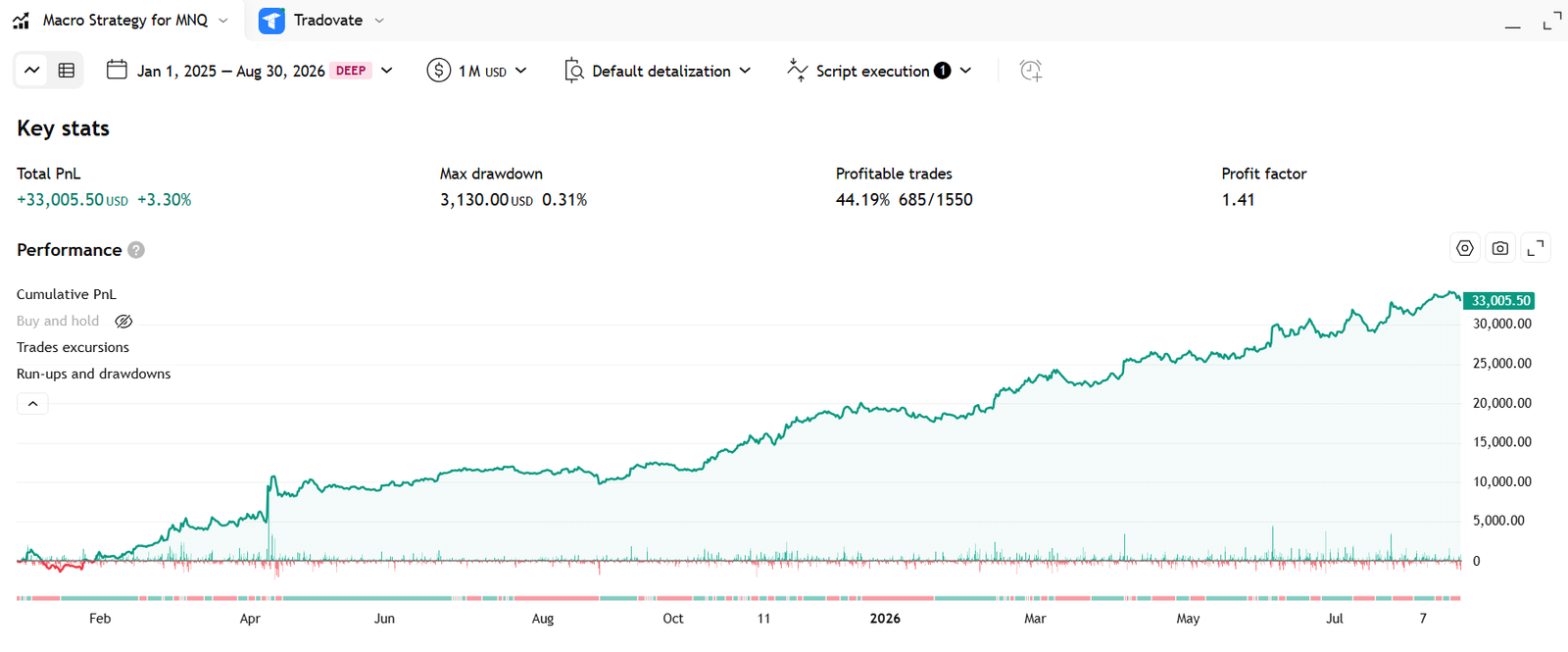
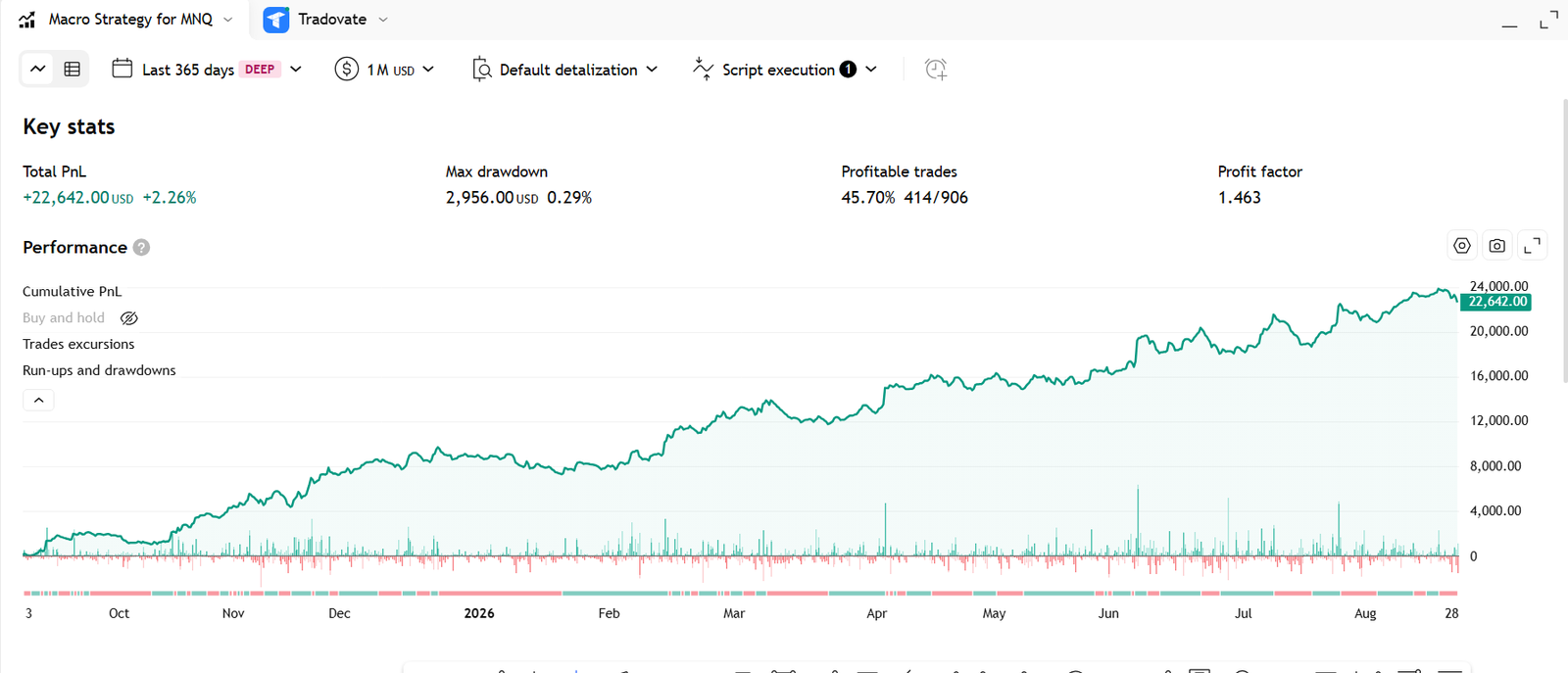
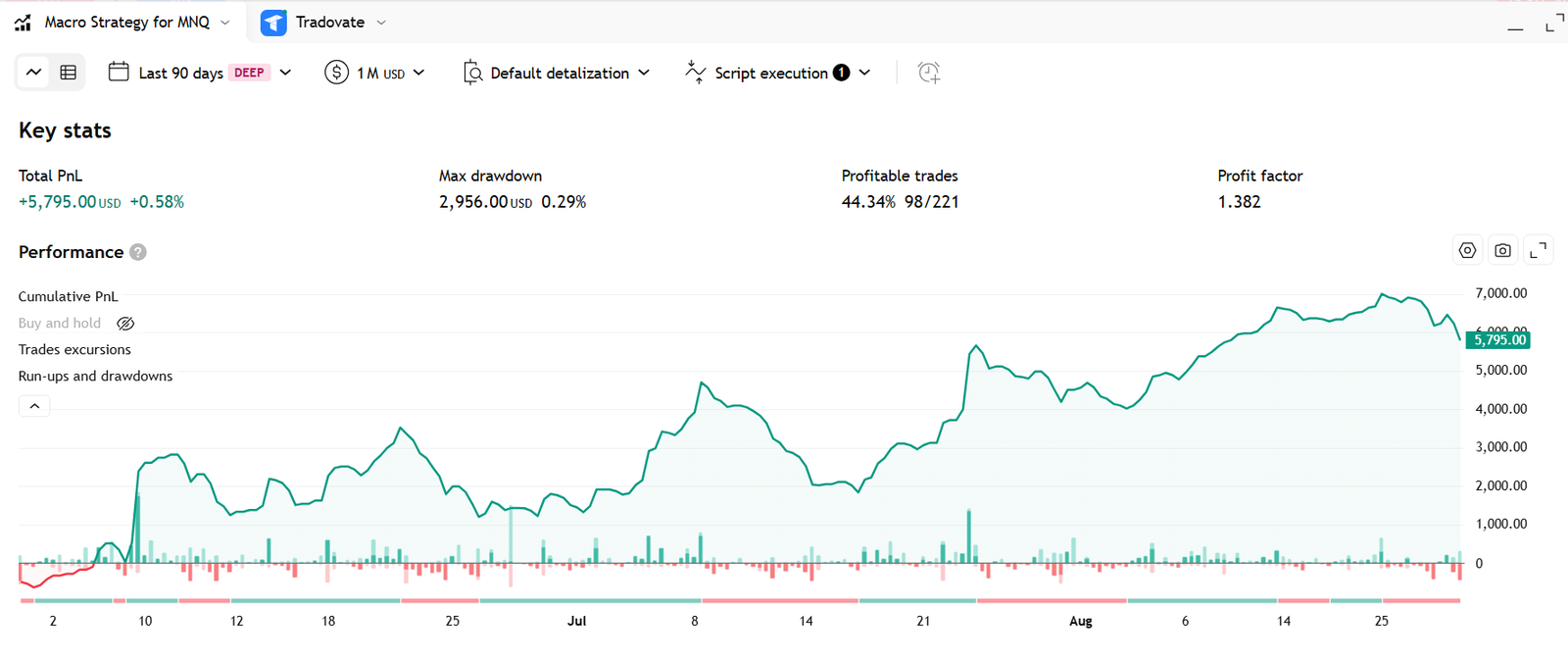
Every result below uses a fixed order size of 3 MNQ contracts per trade. The results are unrelated to a $1 million starting balance. They illustrate historical behavior and are not a promise of future returns.
Max drawdown $3,130
44.19% profitable, 685/1550
Profit factor 1.41
Max drawdown $2,956
45.70% profitable, 414/906
Profit factor 1.463
Max drawdown $2,956
44.34% profitable, 98/221
Profit factor 1.382
How to Get Started
- Choose a monthly, annual, or lifetime plan.
- Add the Macro indicator in TradingView and follow the setup tutorial.
- Validate parameters, alert direction, and order behavior in simulation first.
- If automation is required, connect PickMyTrade and begin with minimum risk.
- Monitor slippage, commissions, connectivity, and strategy behavior regularly.
Plans and Pricing
Annual
Includes a seven-day trial for users who have completed initial testing.
Frequently Asked Questions
Can the Macro indicator guarantee stable profits?
After six months of live trading tests and TradingView historical backtests, the overall structure has been very satisfactory. However, historical data does not represent the future, and using this strategy does not guarantee 100% profitability.
Which markets can the Macro indicator be used for?
The Macro indicator is designed specifically for MNQ futures and is recommended only for MNQ automated trading. Other markets have not been tested; use caution.
Can the Macro indicator automate trades?
The Macro indicator can automate trades by connecting TradingView with PickMyTrade. PickMyTrade is a paid third-party platform.
Is there a way to use the Macro indicator for free?
The Macro indicator provides a free seven-day trial. If you are not satisfied after seven days, you can stop the subscription.
Lifetime members can receive lifetime access to the Macro strategy as well as ongoing access to trading live streams.
Is the Macro indicator refundable?
Refunds are no longer available after the seven-day period.
Where can I find the Macro indicator setup tutorial?
The Macro indicator setup tutorial is published on YouTube. Use the link below to watch it.
https://www.youtube.com/watch?v=YpHrFhG_PEs
https://www.youtube.com/watch?v=EK5t8XYm53A&t=2s
https://www.youtube.com/watch?v=u8-09AeerAI&t=3s